Nicostrata – Visual Markdown for Mac
Visual Markdown · macOS

Markdown files.
No Markdown headaches.

Nicostrata is a native Mac writing app that saves everything as plain .md files – while letting you write, organize, and check portability without knowing a single line of Markdown syntax.

Coming Soon to the Mac App Store
7-day free trial.
One-time purchase.
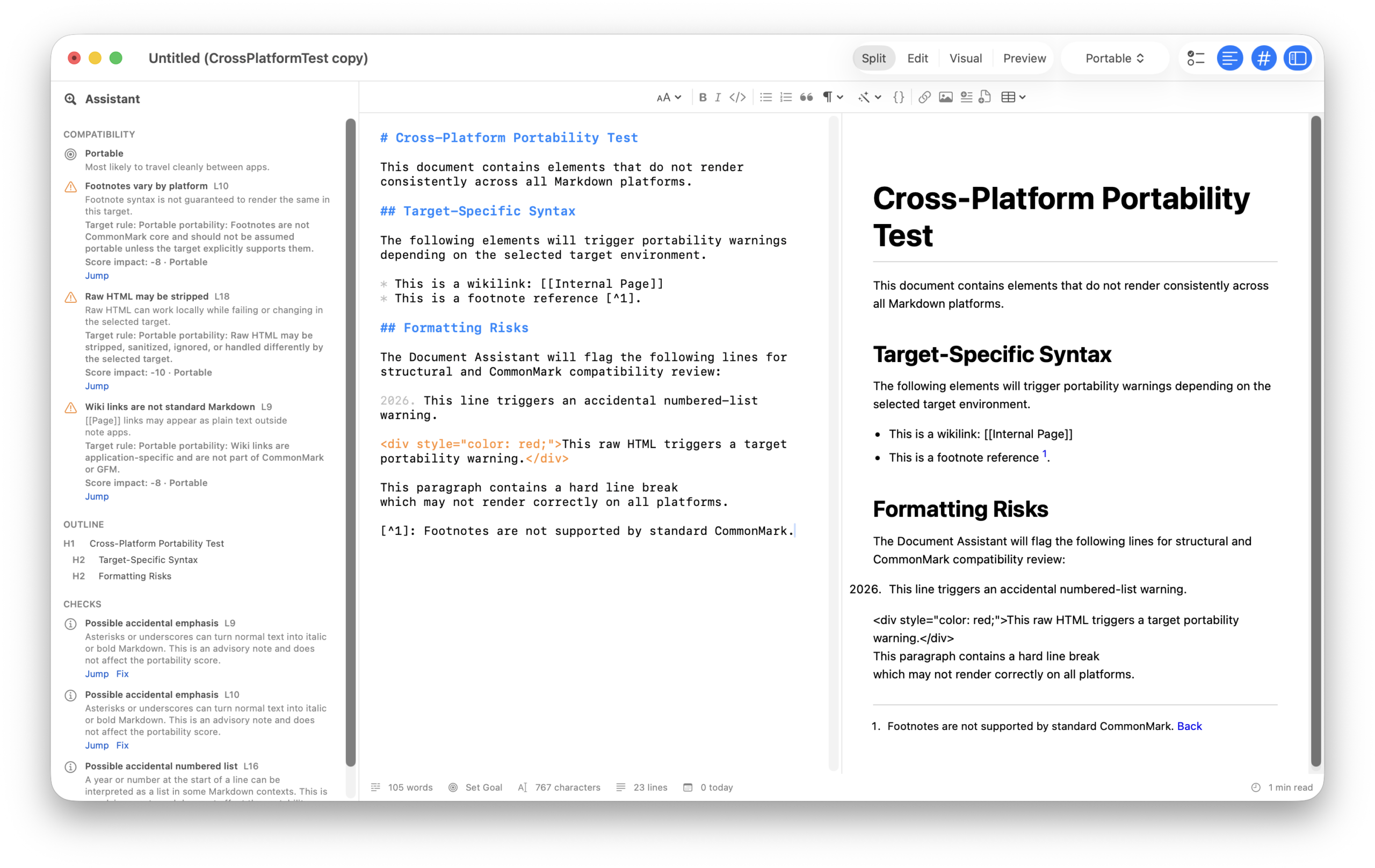
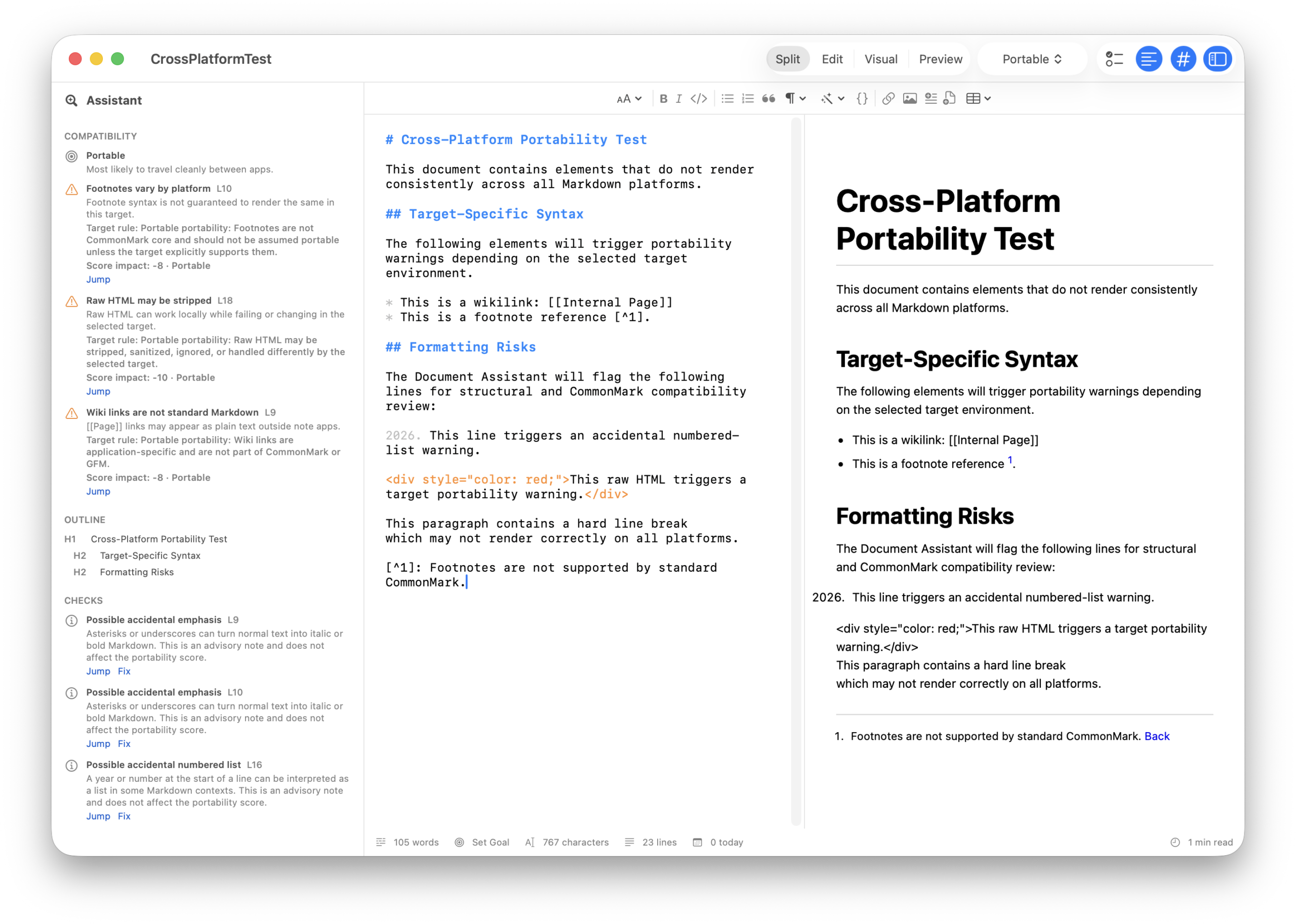
Nicostrata Visual Markdown editor showing Visual Blocks mode with Document Assistant
Visual Block Editing
Plain .md Files
Portability Score
Pay Once
Export HTML & PDF
Focus Mode
7-Day Free Trial
Works Offline
Folder Browser
No Account Required
Check Before Sharing
7 Built-In Templates
Visual Block Editing
Plain .md Files
Portability Score
Pay Once
Export HTML & PDF
Focus Mode
7-Day Free Trial
Works Offline
Folder Browser
No Account Required
Check Before Sharing
7 Built-In Templates
Four ways to work

Write how you think, not how Markdown thinks.

Switch modes anytime – your document stays the same plain .md file underneath every one of them.

✏️
Edit
Full raw Markdown source with syntax highlighting. The mode for power users who want complete control.
Split
Source and live preview side by side. Edit on the left, watch it render on the right in real time.
🧱
Visual
Block-based editing. Click to edit headings, paragraphs, tables, checklists, and images – no syntax required.
★ Signature feature
👁️
Preview
Clean rendered output. See exactly what your reader sees before you export, share, or publish.
What makes Nicostrata different

The features writers keep asking for.

Visual Mode
Edit documents without ever typing a symbol.
Visual mode shows your document as formatted blocks – headings, paragraphs, tables, checklists, code, images. Click any block to edit it in place. The underlying .md file stays clean and portable. No Markdown knowledge needed. No proprietary format either.

Double-click any visual block to jump to the exact source line in Edit mode. Power users can live in Edit – everyone else can live in Visual.
Portability Score
Know where your document will work before you share it.
No other Mac Markdown editor does this. Nicostrata’s Document Assistant scores your document against five real-world targets: GitHub (code repositories), Obsidian (a popular personal notes app), Reddit (community forums), any blog or website, and a universal Portable format. It shows exactly which formatting choices will break on each destination – before you share. One-click Fix buttons repair the issues without touching the rest of your document.
Export
Four ways out. All of them clean.
Export to self-contained HTML (images embedded as data URIs), text-selectable PDF, a Markdown package with a bundled assets folder, or copy rendered HTML directly to paste into Ghost, WordPress, Notion, or email. All exports use the same standards-backed CommonMark/GFM renderer as the preview pane – what you see is what you get.
Also built in

Everything else you’d want from a serious writing app.

📁
Folder Browser
Open any folder as a workspace. Navigate, rename, create, and delete .md files from a sidebar without touching Finder.
🎯
Focus Mode
One keystroke hides everything but the text. A centered column, near-black background, and typewriter scrolling that keeps your line in the middle of the screen.
📋
7 Built-In Templates
Start from a GitHub README, blog post, meeting notes, product spec, release notes, or documentation page. Save your own templates too.
🔍
Find & Replace
Full find and replace across the Markdown source. Match count, case-sensitive and whole-word toggles, and a Replace All that undoes in a single step.
🎨
Custom Preview Themes
Choose Default, GitHub, Minimal, or Solarized. Or paste your own CSS. Preview styling never bleeds into your exports unless you explicitly choose a theme at export time.
🖊️
Word Goals & Session Tracking
Set a target word count per document. Watch a live progress bar fill as you type. A daily session counter resets at midnight so you can track how much you wrote today.
Table Tools
Insert a table visually, then add and remove rows and columns by clicking – no pipe characters or manual cell spacing required. The saved file is always clean, standard Markdown.
🔗
Link & Image Validation
The Document Assistant flags missing images and non-portable absolute paths. Enable optional remote URL checking to catch broken links before sharing.
📝
Syntax Highlighting
Edit mode colors headings, bold, italic, links, code fences, blockquotes, and list markers so the raw source is readable at a glance – without changing the file.
See it in action

Every mode. One clean window.

Nicostrata Document Assistant and portability score
Who it’s for

One app. Three very different reasons to use it.

Developers & Technical Writers
You live in Markdown.
Your tools shouldn’t fight you.

“I need to know my README will render on GitHub without surprises – and I don’t want to pay monthly for a notes app.”

Write READMEs and changelogs in Edit mode with syntax highlighting
Check GitHub/Obsidian/Website compatibility before committing
Export clean HTML for documentation sites
Version-control your .md files – they’re just text
Writers & Content Creators
You want your files.
Not locked out of them.

“Ulysses charges me $50/year and locks my work in a proprietary library. I just want a file I can open anywhere.”

Draft in Visual mode – no Markdown syntax to learn
Export polished PDF for clients, HTML for Ghost or WordPress
Write in Focus mode with typewriter scrolling
Start from a blog post template and go
Product Managers & Knowledge Workers
You’re done managing
Notion as a second job.

“Notion became more complex than the projects I was using it to track. My docs belong in files, not a database.”

Write PRDs, specs, and meeting notes in Visual mode
Organize files in a folder browser – open any existing .md
Check portability before sharing with GitHub or Confluence
No account, no cloud, no lock-in – just files
📂
Plain .md files
Your documents are standard Markdown text files. Open them in any editor, terminal, or version control system.
🔒
No account required
Nicostrata has no login, no cloud service, and no servers. Normal editing and export never make a network request.
Works offline
A fully native macOS app. No internet dependency for writing, previewing, exporting, or checking portability.
💳
Pay once
One-time purchase. Try free for 7 days, then buy once. No annual renewal, no feature gating, no surprise price changes.
Coming to Mac App Store

Try it free for 7 days.

The full app – every mode, every feature, every export format – free for a week. Then one purchase, and it’s yours. No renewal reminders. No feature tiers.

Coming Soon to Mac App Store

Requires macOS 14 or later · Mac App Store